
本站使用的日主题,最近更新了网站智能多语言功能,但是开启后样式很丑,网上也没搜到相关美化,通过deepseek美化了一下,分享给大家。
点此购买本站主题 RiTheme主题-高品质的WordPress主题
成品展示👇👇👇
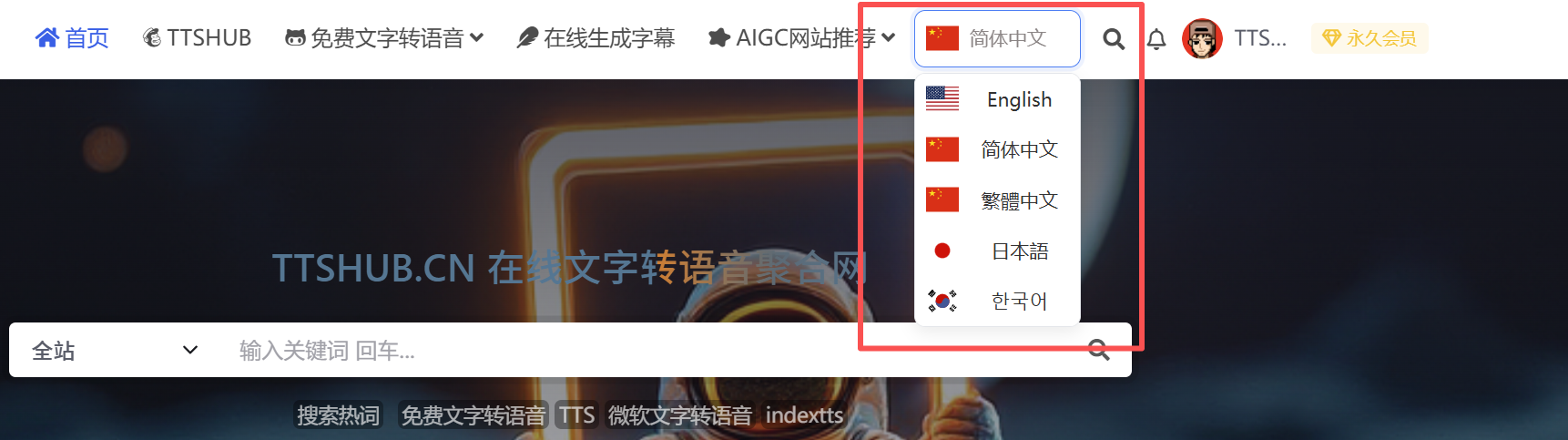 js代码👇👇👇
<script>
document.addEventListener('DOMContentLoaded', function() {
    // 1. 核心配置:语言-国旗映射(使用CDN图片)
    const flagConfig = {
        'english': {
            code: 'us',
            name: 'English'
        },
        'chinese_simplified': {
            code: 'cn',
            name: '简体中文'
        },
        'chinese_traditional': {
            code: 'cn',
            name: '繁體中文'
        },
        'japanese': {
            code: 'jp',
            name: '日本語'
        },
        'korean': {
            code: 'kr',
            name: '한국어'
        }
    };
    const flagCDN = 'https://cdn.jsdelivr.net/npm/flag-icon-css/flags/4x3/';

    // 2. 获取原生select并强制隐藏(增加多层样式保障)
    const originalSelect = document.getElementById('translateSelectLanguage');
    if (!originalSelect) {
        console.warn('未找到translateSelectLanguage元素');
        return;
    }
    // 强制隐藏:行内样式 + !important,防止被其他样式覆盖
    originalSelect.style.cssText = `
        display: none !important;
        visibility: hidden !important;
        position: absolute !important;
        z-index: -9999 !important;
        width: 0 !important;
        height: 0 !important;
        opacity: 0 !important;
    `;

    // 3. 新增完整的下拉容器(包含国旗元素)
    const selectContainer = document.createElement('div');
    selectContainer.className = 'custom-select-container';
    originalSelect.parentNode.insertBefore(selectContainer, originalSelect);

    // 3.1 新增触发按钮(包含国旗图标+文字)
    const triggerBtn = document.createElement('div');
    triggerBtn.className = 'custom-select-trigger';
    triggerBtn.tabIndex = 0; // 支持键盘聚焦

    // 新增国旗图标元素
    const flagIcon = document.createElement('span');
    flagIcon.className = 'custom-flag-icon';

    // 新增文字显示元素
    const textSpan = document.createElement('span');
    textSpan.className = 'custom-select-text';

    triggerBtn.appendChild(flagIcon);
    triggerBtn.appendChild(textSpan);
    selectContainer.appendChild(triggerBtn);

    // 3.2 新增下拉列表容器
    const dropdownList = document.createElement('div');
    dropdownList.className = 'custom-select-dropdown';
    dropdownList.style.display = 'none'; // 默认隐藏
    selectContainer.appendChild(dropdownList);

    // 4. 注入核心样式(修复悬浮透明问题)
    const styleContent = `
        /* 强制隐藏原生select(双重保障) */
        #translateSelectLanguage {
            display: none !important;
            visibility: hidden !important;
        }

        /* 容器样式 */
        .custom-select-container {
            position: relative;
            display: inline-block;
            font-family: "Microsoft YaHei", sans-serif;
        }

        /* 触发按钮样式 */
        .custom-select-trigger {
            background-color: transparent;
            height: 42px;
            padding: 0 25px 0 40px;
            border: 1px solid #e5e7eb;
            border-radius: 8px;
            font-size: 14px;
            color: #8b8585;
            display: flex;
            align-items: center;
            cursor: pointer;
            position: relative;
            transition: border-color 0.2s;
            opacity: 1 !important; /* 强制不透明 */
        }

        .custom-select-trigger:hover {
            border-color: #94a3b8;
            opacity: 1 !important; /* 悬浮时仍不透明 */
        }

        .custom-select-trigger:focus {
            outline: none;
            border-color: #3b82f6;
            box-shadow: 0 0 0 3px rgba(59, 130, 246, 0.1);
            opacity: 1 !important; /* 聚焦时不透明 */
        }

        /* 国旗图标样式(新增元素) */
        .custom-flag-icon {
            width: 24px;
            height: 18px;
            position: absolute;
            left: 8px;
            top: 50%;
            transform: translateY(-50%);
            background-size: cover;
            background-position: center;
            opacity: 1 !important; /* 国旗图标强制不透明 */
        }


        /* 下拉列表样式 */
        .custom-select-dropdown {
            position: absolute;
            top: calc(100% + 4px);
            left: 0;
            width: 100%;
            max-height: 200px;
            overflow-y: auto;
            border: 1px solid #e5e7eb;
            border-radius: 8px;
            background-color: #fff;
            box-shadow: 0 4px 12px rgba(0,0,0,0.08);
            z-index: 999;
            opacity: 1 !important; /* 下拉框容器强制不透明 */
        }

        /* 下拉选项样式 - 核心修复:悬浮不透明 */
        .custom-select-option {
            padding: 8px 8px 8px 40px;
            font-size: 14px;
            color: #333;
            cursor: pointer;
            position: relative;
            transition: background-color 0.2s;
            background-color: #fff; /* 基础背景色 */
            opacity: 1 !important; /* 强制不透明 */
        }

        /* 悬浮样式:仅改背景色,无任何透明效果 */
        .custom-select-option:hover {
            background-color: #f8fafc !important; /* 浅灰背景 */
            opacity: 1 !important; /* 悬浮时强制100%不透明 */
            color: #333 !important; /* 文字颜色不变 */
        }

        /* 下拉选项内的国旗图标(新增元素) */
        .custom-select-option .custom-flag-icon {
            position: absolute;
            left: 8px;
            top: 50%;
            transform: translateY(-50%);
            opacity: 1 !important; /* 选项内国旗强制不透明 */
        }
    `;
    const styleTag = document.createElement('style');
    styleTag.textContent = styleContent;
    document.head.appendChild(styleTag);

    // 5. 初始化下拉选项(为每个选项新增国旗元素)
    function initOptions() {
        dropdownList.innerHTML = ''; // 清空原有选项
        // 遍历原生option,创建模拟选项
        Array.from(originalSelect.options).forEach(option => {
            const value = option.value;
            const config = flagConfig[value] || flagConfig['chinese_simplified'];

            // 创建单个选项容器
            const optionItem = document.createElement('div');
            optionItem.className = 'custom-select-option';
            optionItem.dataset.value = value;

            // 为选项新增国旗图标元素
            const optionFlag = document.createElement('span');
            optionFlag.className = 'custom-flag-icon';
            optionFlag.style.backgroundImage = `url(${flagCDN}${config.code}.svg)`;
            optionFlag.style.opacity = '1 !important'; // 国旗图标强制不透明

            // 选项文字
            const optionText = document.createElement('span');
            optionText.textContent = config.name;

            optionItem.appendChild(optionFlag);
            optionItem.appendChild(optionText);
            dropdownList.appendChild(optionItem);

            // 绑定选项点击事件
            optionItem.addEventListener('click', function() {
                const selectedValue = this.dataset.value;
                // 更新原生select的值(同时确保原生select仍隐藏)
                originalSelect.value = selectedValue;
                originalSelect.style.display = 'none !important';
                // 更新触发按钮的国旗和文字
                updateTrigger(selectedValue);
                // 隐藏下拉列表
                dropdownList.style.display = 'none';
                // 触发原生select的change事件
                originalSelect.dispatchEvent(new Event('change'));
            });
        });
    }

    // 6. 更新触发按钮的国旗和文字
    function updateTrigger(value) {
        const config = flagConfig[value] || flagConfig['chinese_simplified'];
        // 更新国旗图标
        flagIcon.style.backgroundImage = `url(${flagCDN}${config.code}.svg)`;
        flagIcon.style.opacity = '1 !important'; // 国旗强制不透明
        // 更新文字
        textSpan.textContent = config.name;
        // 再次确认原生select隐藏
        originalSelect.style.display = 'none !important';
    }

    // 7. 绑定触发按钮事件(展开/收起下拉)
    triggerBtn.addEventListener('click', function() {
        dropdownList.style.display = dropdownList.style.display === 'none' ? 'block' : 'none';
        // 点击时再次确保原生select隐藏
        originalSelect.style.display = 'none !important';
    });

    // 8. 点击外部收起下拉
    document.addEventListener('click', function(e) {
        if (!selectContainer.contains(e.target)) {
            dropdownList.style.display = 'none';
            // 点击外部时也确保原生select隐藏
            originalSelect.style.display = 'none !important';
        }
    });

    // 9. 键盘操作支持(可选)
    triggerBtn.addEventListener('keydown', function(e) {
        if (e.key === 'Enter' || e.key === 'Space') {
            e.preventDefault();
            dropdownList.style.display = dropdownList.style.display === 'none' ? 'block' : 'none';
        }
    });

    // 初始化
    initOptions();
    updateTrigger(originalSelect.value); // 设置初始选中状态
});
</script>
css代码
// 在style标签中添加媒体查询
const style = document.createElement('style');
style.textContent = `
    /* 默认显示自定义下拉(PC端) */
    .custom-select-container {
        display: inline-block;
    }

    /* 手机端隐藏自定义下拉,显示原生select */
    @media screen and (max-width: 1200px) {
        .custom-select-container {
            display: none !important;
        }

        #translateSelectLanguage {
            display: block !important;
            visibility: visible !important;
            opacity: 1 !important;
            position: static !important;
            width: 100% !important;
            height: auto !important;
        }
    }

    /* 其他原有样式... */
    .custom-select-trigger {
        /* ... 原有样式 */
    }
`;

document.head.appendChild(style);
声明:本站所有文章,如无特殊说明或标注,均为本站原创发布。任何个人或组织,在未征得本站同意时,禁止复制、盗用、采集、发布本站内容到任何网站、书籍等各类媒体平台。如若本站内容侵犯了原著者的合法权益,可联系我们进行处理。

评论(0)